Pioneer XDJ-RX3 vs XDJ-XZ: which is the better buy?
Last updated: September 23, 2026
The Pioneer XDJ-RX3 and XDJ-XZ are two excellent standalone all-in-one systems built around different priorities.
The RX3 offers a more modern, compact experience. Its 10.1-inch touchscreen, Touch Preview and newer browsing interface make finding and preparing music during a set much more convenient. It is an excellent choice if you only need two channels and prioritise the screen, workflow and portability.
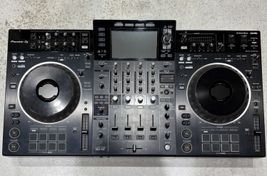
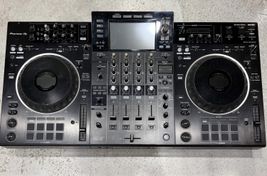
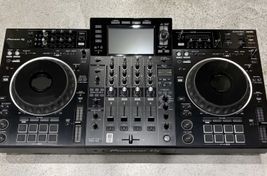
The XZ focuses on the physical feel of a club booth. It has full-size jogs, a 4-channel mixer, construction we consider superior, more control over Beat FX through FX Frequency and much greater scope for integrating turntables or external players.
The XZ's 4-channel mixer does not mean four internal USB decks. It has two internal standalone decks for USB playback. The other channels require external sources or compatible DJ software.
Using the September 2026 used-price references, allow around €1,800 to €1,900 for the RX3 and €2,300 for the XZ.
Choose the RX3 for two-channel mixing, the screen, browsing and portability. Choose the XZ for full-size jogs, construction, expansion and a feel closer to CDJ + DJM.
Sounds Market Score
Pioneer XDJ-RX3: 9.2/10
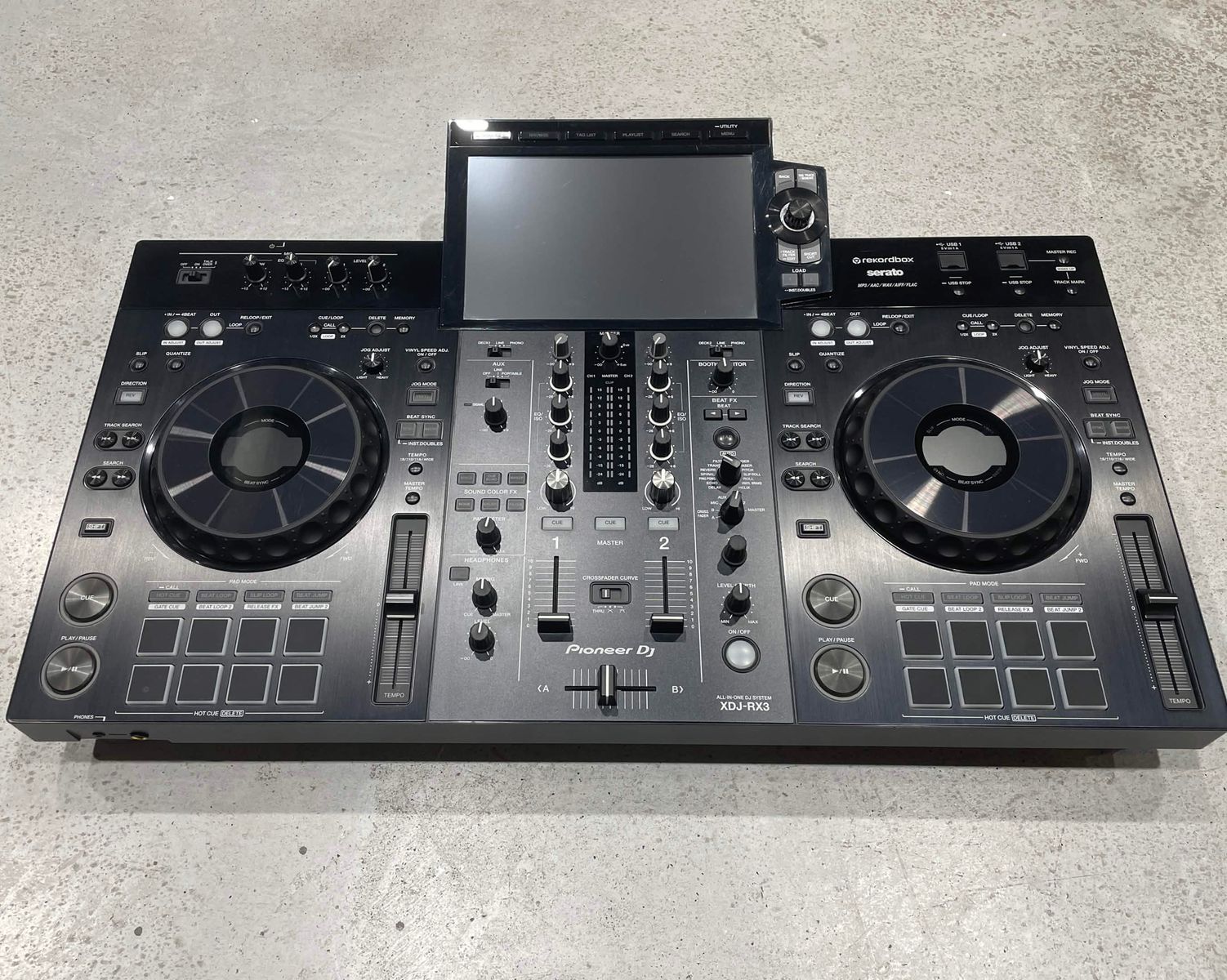
One of our leading recommendations for a 2-channel standalone system. The 10.1-inch screen, Touch Preview, modern browsing and good construction make it exceptionally well rounded. If you know you do not need more than two channels, it remains an excellent option.
Pioneer XDJ-XZ: 9.4/10
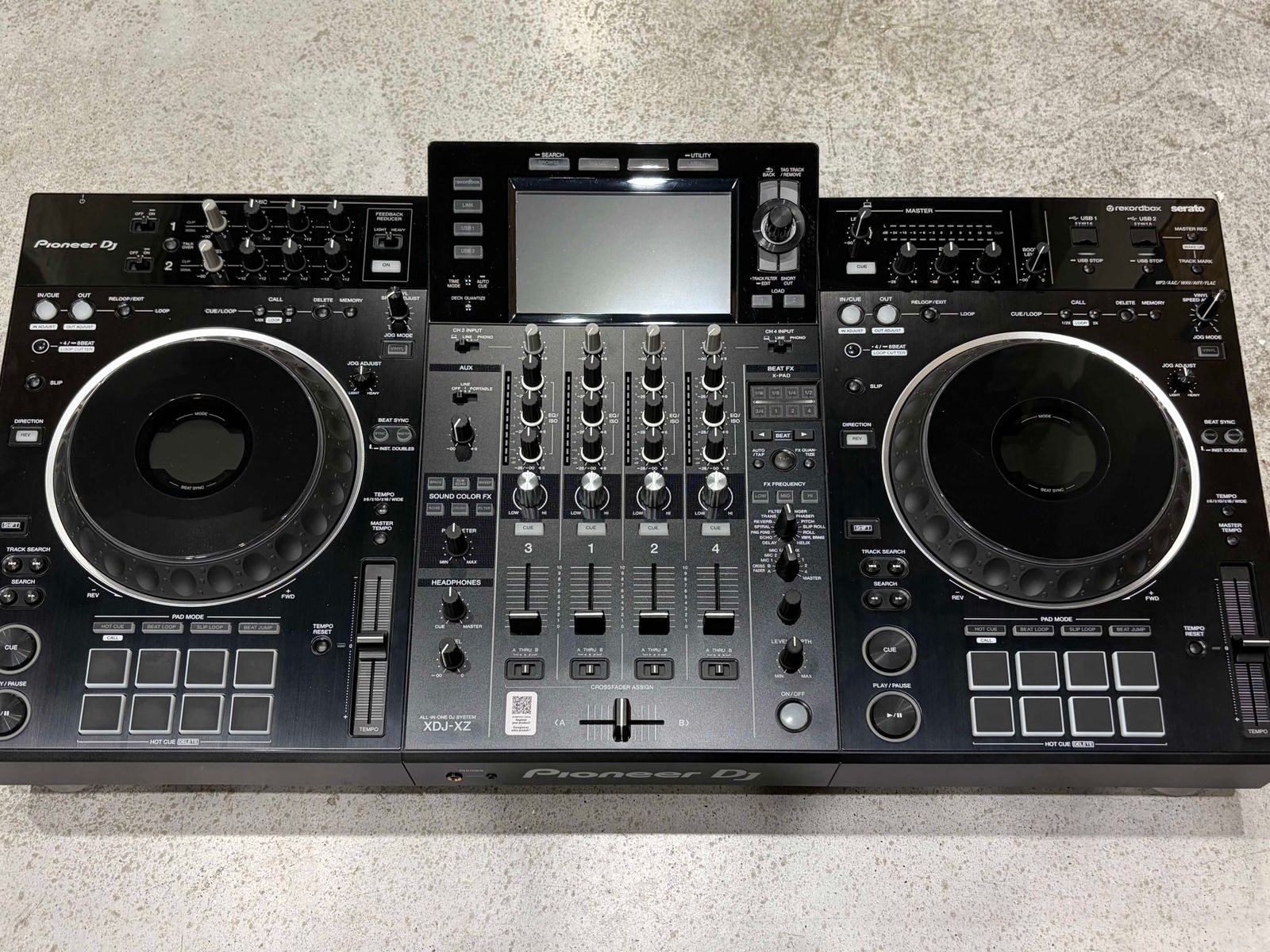
One of our favourite all-in-ones. Its construction, full-size jogs, 4-channel mixer, controls and expansion options deliver a much closer approximation to a club setup. Having only two internal standalone decks is its main weakness, but it remains an outstanding machine despite its age.
Pros and cons
XDJ-RX3
Pros
- 10.1-inch touchscreen.
- Touch Preview.
- More modern browsing.
- 3Band Waveform.
- More compact and lighter.
- Excellent standalone operation.
- Very good reliability.
- Ideal if you only need 2 channels.
Cons
- Only 2 mixer channels.
- Smaller jogs than the XZ's full-size units.
- No FX Frequency LOW / MID / HI controls for Beat FX.
- Less room to expand with multiple sources.
- Very good construction, although the XZ feels more like professional booth equipment.
XDJ-XZ
Pros
- 4-channel mixer.
- Full-size jogs.
- FX Frequency LOW / MID / HI for Beat FX.
- Excellent construction.
- High-quality faders and controls.
- Layout closely aligned with a CDJ + DJM booth.
- Extensive expansion options.
- Pro DJ Link.
- Very reliable.
Cons
- Only 2 internal standalone decks play directly from USB.
- 7-inch touchscreen.
- Older-generation browsing.
- No Touch Preview.
- Larger and heavier.
- More expensive.
- Its main strengths may go unused if you only mix on two channels.
XDJ-RX3 vs XDJ-XZ: key differences
| Feature | XDJ-RX3 | XDJ-XZ |
|---|---|---|
| Mixer channels | 2 | 4 |
| Internal standalone decks | 2 | 2 |
| Screen | 10.1-inch touchscreen | 7-inch touchscreen |
| Touch Preview | Yes | No |
| 3Band Waveform | Yes | No |
| Jogs | Compact | Full-size, 206 mm |
| Jog Feeling Adjust | Yes | Yes |
| On Jog Display | Yes | Yes |
| Performance Pads | 8 per deck | 8 per deck |
| Beat FX | 14 | 14 |
| Sound Color FX | 6 | 6 |
| FX Frequency LOW / MID / HI | No | Yes |
| External sources | Yes | Yes, greater capacity |
| Pro DJ Link with compatible players | No | Yes |
| Approximate weight | 9.3 kg | 13 kg |
| Approximate used price | €1,800 to €1,900 | €2,300 |
| Sounds Market Score | 9.2/10 | 9.4/10 |
Two different standalone approaches
The XZ arrived before the RX3, and its interface shows its age more clearly. Their priorities differ too. The RX3 modernises the RX2 concept with two decks, two channels and a large central screen. The XZ brings the physical experience of a club booth into one unit through full-size jogs, four mixer channels and room to expand.
Your choice depends on the setup you want in front of you, as well as which model is newer.
Screen and browsing: a clear win for the RX3
The XZ's 7-inch touchscreen is functional and feels close to the RX2 generation. The RX3 moves to 10.1 inches, with more information visible and easier library and waveform browsing. 3Band Waveform also distinguishes low, mid and high frequencies visually on tracks analysed in rekordbox.
Touch Preview is another practical improvement. Touch a point in a track's waveform in the RX3 browser and listen through your headphones without loading it into a deck. You can check several tracks or different passages before choosing the next tune. The XZ does not have this feature.
The improvement is in both screen size and the process of finding music. Try them back to back and this is likely to be the first clear RX3 advantage you notice. For screen and browsing, we prefer the RX3.
Jogs: size is the main difference
Both have Jog Feeling Adjust, so adjustable resistance is not an advantage unique to either model. Both also offer On Jog Display.
The XZ uses full-size 206 mm jogs, bringing the physical feel much closer to professional Pioneer DJ players. The RX3's compact jogs work well, but they do not provide the same surface area.
If you are used to professional CDJs, you will notice that difference. We prefer the XZ here primarily for the size and physical experience.
Two versus four channels: understand the limitation
The RX3 has a 2-channel mixer and the XZ has a 4-channel mixer. However, the XZ cannot play four tracks from USB using only its internal decks. It has two internal standalone decks.
The additional mixer channels accommodate external players, turntables, other sources or decks controlled through compatible DJ software. For example, you can use the XZ's internal decks and connect two Technics turntables to the remaining channels.
Pro DJ Link also lets the XZ integrate with compatible Pioneer DJ players. This makes it much more flexible as the centre of a larger setup. If your plan is to plug in a USB drive and use four internal standalone decks, though, the XZ does not work that way.
The XZ feels much closer to a club booth
Think of the XZ in terms of a CDJ and DJM setup. We regularly see it in professional DJs' home setups, where its layout, jogs and mixing approach let them practise and prepare sets without buying two separate CDJs and a mixer.
The layout is strongly inspired by the CDJ-2000NXS2 and DJM-900NXS2 generation. That does not mean its internals are literally those three products combined.
Full-size jogs, the central mixer section, Beat FX, Sound Color FX and familiar control placement make the transition from practising at home to a Pioneer DJ club booth feel particularly natural.
Construction: why we favour the XZ
The RX3 is well built and our experience with it is very good. Side by side, however, we clearly prefer the XZ's feel. Its casing, faders, jogs, knobs and other controls feel extremely solid.
It is a large, heavy machine built for demanding use. For us, construction remains one of the strongest reasons to choose an XZ even when newer technology is available.
Effects: equal counts, more control on the XZ
Both systems have 14 Beat FX and 6 Sound Color FX. The important distinction is how you can apply the Beat FX.
The XZ has FX Frequency, with independent LOW, MID and HI controls for selecting the frequency ranges affected. You can, for example, apply Echo to mids and highs while leaving bass outside the effect. During a transition, that helps keep the low end cleaner while working creatively with the rest of the spectrum.
The RX3 does not have these LOW / MID / HI controls. Its effects section is still extremely complete and includes other possibilities such as Release FX through the Performance Pads. For control over Beat FX specifically, we prefer the XZ.
Performance Pads
Both offer 8 Performance Pads per deck for Hot Cues and other performance functions. Both are well equipped for sets built around Hot Cues, loops and active pad use.
We would not make this section the deciding factor: neither has a major limitation for that general style of mixing.
Connecting turntables or external players
The XZ's four mixer channels make it a much stronger foundation for an expanding booth. Start with its two internal decks, then add Technics turntables, external players or a mixture of sources as your setup develops.
Pro DJ Link provides further integration with compatible Pioneer DJ players. That gives the XZ considerable long-term flexibility.
The RX3 also accepts external sources, but its two-channel architecture limits how many sources you can mix together. That may not matter if you always work with two decks. If you want to build a larger booth around the all-in-one, the XZ is our clear preference.
Portability
The RX3 wins for regular transport. It is more compact and weighs approximately 9.3 kg, compared with around 13 kg for the XZ.
The XZ is still transportable. A suitable bag lets you carry two standalone decks, full-size jogs, a four-channel mixer, effects, screen and connections in one unit.
It is not something you will want to move unnecessarily every day, but it remains practical compared with transporting two professional players, a mixer, flight cases and cables.
Sound quality
Both deliver sound quality suitable for professional use. We particularly like the XZ in this respect too and have seen it perform very well in high-end home setups, events and booths.
We would not choose between them on sound quality alone. Workflow, construction, screen and expansion are more significant differences.
The Sounds Market workshop view
We have a particularly positive view of the XZ, including from a technical perspective. Its construction is solid, its jogs work well and its faders are good quality. We have not identified a serious recurring problem that would make us distrust the model.
After extensive use, units can arrive with worn buttons or components needing maintenance. In our experience, this is normal wear on used professional DJ equipment, rather than evidence of a structural defect.
Our experience with the RX3 is also positive. It is robust and we have not found a particularly concerning recurring issue. We consider both reliable.
The XZ's main advantage here is the more professional feel of its construction and controls. A used XZ in good condition and properly checked inspires a lot of confidence in our workshop.
Used-market prices
Approximate references from September 2026:
- XDJ-RX3: €1,800 to €1,900.
- XDJ-XZ: around €2,300.
Prices vary with condition, included accessories and market changes. The gap is approximately €400 to €500. That is meaningful, but it buys a different approach to the setup, rather than simply a different screen or a few extra functions.
Is the XDJ-XZ worth the extra money?
Probably not if you only need two channels, want a compact system and prioritise the screen and browsing. The RX3 is already a highly capable standalone with a considerably better display and newer interface.
If you want something closer to a club booth, the premium makes more sense. Full-size jogs, four mixer channels, greater Beat FX control, construction and external-source options give the extra €400 to €500 a clearer purpose.
We would pay the difference if we were going to use those strengths.
Who should choose each model?
Buy the XDJ-RX3 if...
- You only need 2 channels.
- You want a large touchscreen.
- You value Touch Preview.
- You prioritise modern browsing.
- You want a more compact system.
- You will transport it frequently.
- You do not need full-size jogs.
- You do not plan to build a four-channel setup.
- You want an excellent standalone without spending around €2,300.
Buy the XDJ-XZ if...
- You want an experience close to a professional booth.
- Full-size jogs matter to you.
- You want a 4-channel mixer.
- You use Beat FX actively and want to apply them by frequency band.
- You want to connect turntables or external players.
- You want Pro DJ Link with compatible players.
- You prioritise construction and physical feel.
- You want to practise on a layout close to CDJ + DJM.
- You are comfortable with a larger unit.
- You can spend an extra €400 to €500.
Comparison ratings
Category ratings are relative to the models in this guide. The Sounds Market Score is our overall editorial product assessment, independent of the comparison.
| Category | XDJ-RX3 | XDJ-XZ |
|---|---|---|
| Screen and browsing | 10/10 | 8/10 |
| Jogs | 8.5/10 | 10/10 |
| Mixer / expansion | 8.5/10 | 10/10 |
| Effects | 9.5/10 | 10/10 |
| Build quality | 9/10 | 10/10 |
| Reliability | 9.5/10 | 9.5/10 |
| Portability | 9/10 | 7.5/10 |
| Booth experience | 8.5/10 | 10/10 |
| Value for money | 9/10 | 9/10 |
| Sounds Market Score | 9.2/10 | 9.4/10 |
The Sounds Market Score is not an arithmetic average of the category ratings.
What other comparisons often miss
- Four channels do not mean four internal decks. The XZ plays two decks from USB; the other channels need external sources or compatible software.
- The better fit depends on your priorities. The RX3 leads on the 10.1-inch screen and Touch Preview; the XZ on full-size jogs, mixer, FX Frequency and construction.
- The XZ's age does not particularly worry us. Our repair and refurbishment experience is very good. A properly checked unit still gives us plenty of confidence.
Pioneer XDJ XZ currently available
See all ->

Frequently asked questions
Is the XDJ-XZ better than the XDJ-RX3?
It depends on how you use it. We favour the XZ for construction, full-size jogs, its four-channel mixer, Beat FX control and expansion.
The RX3 has a much better screen, Touch Preview, newer browsing and a more compact format.
Does the XDJ-XZ offer four-channel standalone playback?
It has a 4-channel mixer but only 2 internal standalone decks for USB playback. The other channels can be used with external sources or compatible DJ software configurations. It is not a four-internal-deck USB system.
Which has the better screen?
The XDJ-RX3. Its touchscreen measures 10.1 inches, compared with 7 inches on the XZ. More modern browsing, 3Band Waveform and Touch Preview make this one of the clearest differences.
Can the XDJ-RX3 preview tracks before loading them?
Yes. Touch Preview lets you touch a track's waveform in the browser and listen through your headphones without first loading it into a deck. The XDJ-XZ does not have this feature.
Which has better jogs?
We prefer the XDJ-XZ. Both have Jog Feeling Adjust and On Jog Display. The main difference is the XZ's full-size 206 mm jogs, which feel closer to professional CDJs.
Do both have the same effects?
Both have 14 Beat FX and 6 Sound Color FX. The XZ adds FX Frequency LOW / MID / HI, letting you choose the frequency bands affected by Beat FX. The RX3 does not have this control.
Which is better for practising before club gigs?
The XDJ-XZ. Its layout, full-size jogs and mixer section make the move to a Pioneer DJ CDJ and DJM booth particularly natural. You can prepare perfectly well on an RX3 too, but the XZ is physically closer.
Which is more reliable?
Our experience with both is very good. The XZ stands out for its robust construction and the few serious problems we encounter in the workshop. We have not found a major recurring RX3 issue that changes our recommendation either.
Is the XDJ-XZ worth another €400 to €500?
It can be if you want full-size jogs, four mixer channels, more Beat FX control and the ability to add other equipment. If you only use the two internal decks and prioritise the screen and browsing, we would choose the RX3 and save the difference.
Which would we buy?
The XDJ-XZ is our overall choice for its construction, controls, reliability, expansion and physical feel.
We would choose the RX3 instead for a DJ who only needs two channels and prioritises the screen, browsing, size and portability.
Thinking about upgrading your equipment?
You can sell your XDJ-RX3, XDJ-XZ or other DJ equipment directly to Sounds Market, or put it towards your next purchase.
Verdict: XDJ-RX3 or XDJ-XZ?
These systems take different approaches to a professional all-in-one. The RX3's newer technology is immediately apparent in its 10.1-inch screen and more modern browsing. Touch Preview genuinely helps with choosing the next track because you can check it before loading a deck. It is compact, capable and reliable, and may be everything a two-channel DJ needs.
The XZ offers a physical experience much closer to a club booth. Full-size jogs, a 4-channel mixer, FX Frequency LOW / MID / HI, excellent construction, Pro DJ Link and support for external players and turntables make it a remarkably complete system.
Its main limitation remains important: four mixer channels do not equal four internal standalone decks. With that understood, it is still one of our favourite all-in-ones. Our Sounds Market Scores are 9.4/10 for the XZ and 9.2/10 for the RX3.
The RX3 is more modern. The XZ feels closer to a professional booth.
- Best screen and browsing: XDJ-RX3
- Best jogs: XDJ-XZ
- Best Beat FX control: XDJ-XZ
- Best construction: XDJ-XZ
- Best for four mixer channels and external sources: XDJ-XZ
- Easier to transport: XDJ-RX3
- Best for a two-channel-only setup: XDJ-RX3
- Closest to CDJ + DJM: XDJ-XZ
- Our overall choice: XDJ-XZ